There is no fixed internal-link count that Google asks every page to hit. But that doesn’t mean the question is pointless. Most sites still get internal linking wrong in one of two ways: they link so sparingly that useful content is hard to discover, or they add so many repeated navigation, sidebar, and footer links that nothing stands out as important. This guide covers what actually determines the right number for a given page and how to build an internal linking pattern that helps readers and crawlers understand your site.
Quick Answer
For a typical blog post, a handful of contextual internal links is often enough. Longer pillar content or resource guides can support more because their job is to route readers to related subtopics. There is no hard ceiling Google enforces for ordinary pages, so the number matters less than the logic behind it: every link should exist because it genuinely helps the reader get to something relevant next.
What Google Actually Says About Link Counts
This is worth clearing up because SEO advice still repeats older link-count folklore. Treat rigid limits such as “100 links per page” as outdated rule-of-thumb advice, not a current universal Google requirement. The better question is whether the page gives users and crawlers a clear path to the most relevant next pages.
Since then, Mueller has been asked the same question in various forms – including specifically about ecommerce sites with millions of pages – and his answer has stayed consistent: there’s no target number, but there is a structural concern. What he watches for is whether Google can still recognize a logical hierarchy when it crawls the site. A homepage linking to top-level categories, categories linking to subcategories, subcategories linking to products – that’s a structure Google can read. A site where every page links to every other page loses that signal, even if no individual page looks spammy on its own.
Gary Illyes has gone further, noting there’s no penalty for internal link over-optimization in the way there might be for unnatural backlinks. So the risk isn’t punishment. It’s dilution – of relevance signals, of link equity, and honestly, of your reader’s attention.
What to Check on Your Own Site
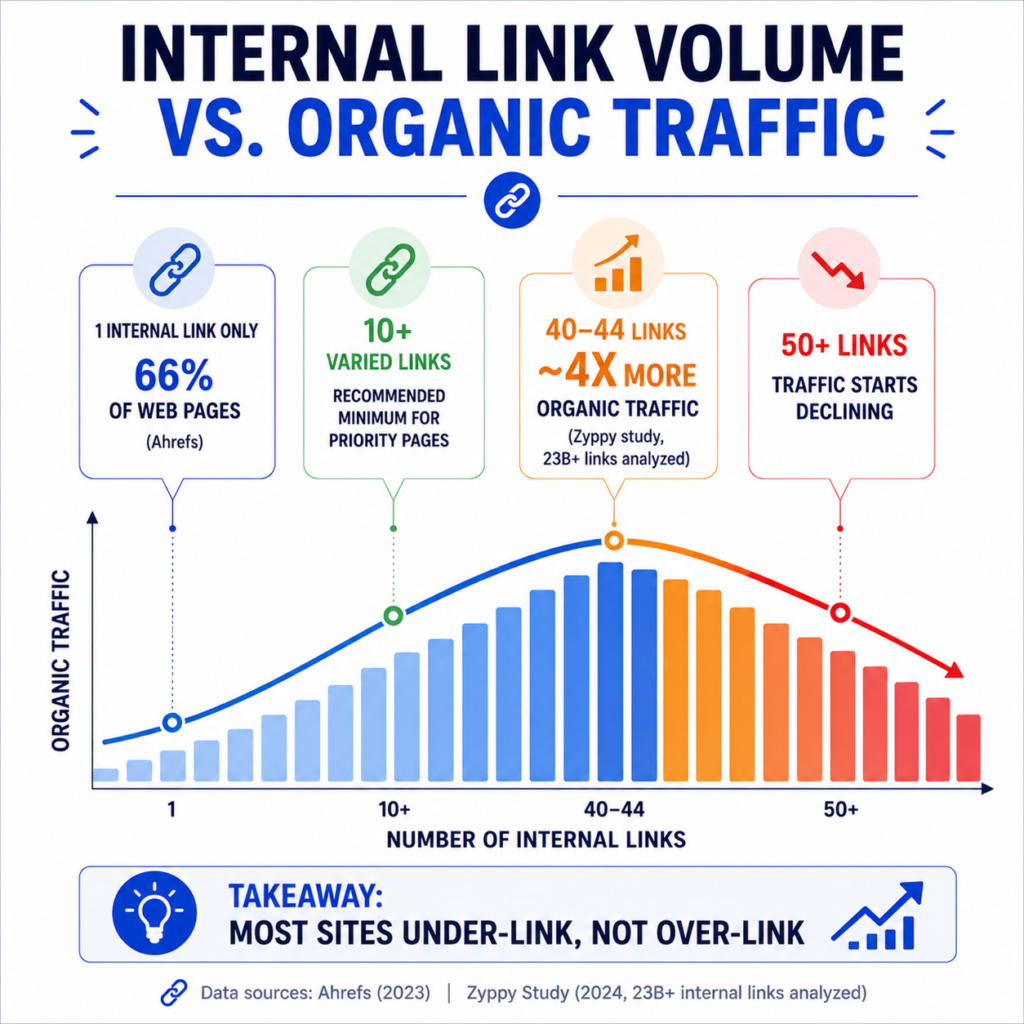
Because there is no universal number, the most useful evidence is often your own site data: which pages are important, which pages receive internal links, which pages are orphaned or nearly orphaned, and which links users actually follow.
A page nobody links to is a page readers and crawlers are less likely to find. A page linked from every template on the site may be discoverable, but those links may not tell much about which related content is most useful. The practical audit is simple: important pages should receive relevant internal links from related content, and each page should link onward only where the next step genuinely helps.
For many small and mid-sized sites, under-linked content is a more common failure mode than over-linked content. That does not make any single link count a rule; it means internal linking should be reviewed as part of normal content maintenance.
None of these numbers are a rule you should follow mechanically. They’re a sanity check. If a cornerstone article on your site has two internal links pointing to it, that’s a signal worth acting on regardless of what any calculator says.
The Real Factors That Determine Your Number
Rather than picking a number first, it helps to work backward from a few variables that actually drive the right count for a specific page.
Content length. A 400-word update doesn’t have room for 15 natural links without feeling forced. A 3,000-word guide can absorb far more without feeling cluttered. A rough starting ratio some practitioners use is one contextual link per 150-300 words of body content, adjusted based on how link-worthy the topic actually is.
Page type and intent. A transactional product page usually needs fewer body links (you don’t want to send someone away from checkout) but more related-product and category links. A pillar or hub article is supposed to link out heavily – that’s its job. A short informational post might only need three or four links total.
Site depth and size. A 20-page brochure site and a 20,000-page ecommerce catalog aren’t playing the same game. Larger sites lean more heavily on internal linking to establish crawl paths to deep pages that get little external attention.
Where the link sits. Navigation, footer, and sidebar links count toward the total, and Mueller has confirmed Google doesn’t treat them differently from body links just because of their position. A page with a large mega-menu might already carry 40-60 links before a single word of body copy is written. That’s worth knowing before you assume your content links are the whole story.
Existing link equity to that page. A page that already ranks well and gets external backlinks doesn’t need to be over-linked internally to prove its importance. A newer or under-performing page you want Google to notice benefits more from a deliberate internal linking push.
Practical Guidelines by Content Length
These are not Google limits. They are planning ranges to sanity-check your own linking decisions against.
| Content Length | Possible Contextual Links | Notes |
| 300-600 words | 2-4 | Short posts, news updates, glossary-style pages |
| 600-1,200 words | 4-8 | Standard blog posts, product pages |
| 1,200-2,500 words | 8-15 | In-depth guides, comparison articles |
| 2,500+ words | 15-25 | Pillar content, ultimate guides, resource hubs |
For a site like this one, that means a calculator explainer or short FAQ page probably doesn’t need more than three or four links out. A long-form guide comparing metrics or walking through a full audit process can comfortably carry more, provided each one leads somewhere genuinely useful.
A Realistic Example
Take a marketing agency running a blog to support its service pages. They publish a 2,200-word guide on improving Google Ads CTR. A version written without much thought to internal linking might drop in two links – one to the homepage, one to the contact page. Technically internal links, but doing almost nothing for site structure.
A better version links to the CTR calculator where the reader can apply the formula immediately, references a related post on why the reader might be seeing low CTR in the first place, points toward CTR benchmarks by industry so the reader can judge their own numbers, and links to a related comparison piece on CTR versus CPC for readers trying to understand the bigger picture. That’s four to six links, each solving a specific next question the reader is likely to have, rather than links chosen because they were available.
This is the difference between linking for SEO checkboxes and linking for actual navigation. The second version is usually more useful because each link answers a likely next question instead of simply increasing the count.
Auditing What You Already Have
Before adding more links to any page, it’s worth knowing what’s already there. Manually counting links across a site with more than a handful of pages isn’t practical, which is where an internal link analyzer earns its keep – it surfaces which pages are heavily linked, which are nearly orphaned, and where your anchor text patterns look repetitive or thin.
It’s also worth pulling a full URL list from your sitemap URL extractor periodically. Pages that exist but never show up as a link target anywhere else on the site are effectively invisible unless they’re getting external traffic. That gap shows up more often than most site owners expect, especially on sites that have published content for a few years without revisiting older posts.
Common Mistakes
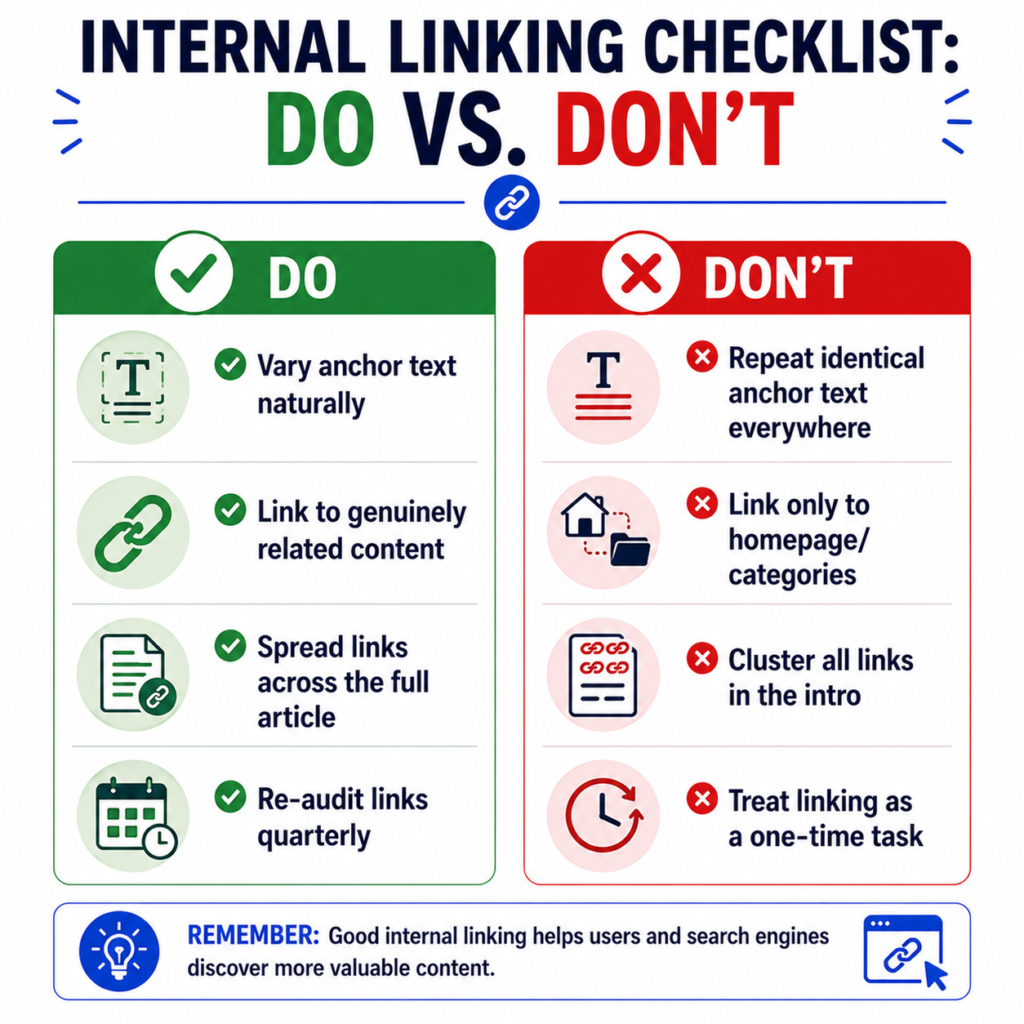
Linking only to the homepage and category pages. This satisfies a navigation structure but does nothing to connect related content to each other. Readers researching a topic in depth want to move sideways to related articles, not just up to a hub page.
Using the same anchor text everywhere. If every internal link to your CTR calculator says “CTR calculator,” that’s fine in moderation, but variation (“check your click-through rate,” “run the numbers here”) gives Google more context about the page and reads more naturally to a human.
Treating internal linking as a one-time task. New content creates new linking opportunities for old content, and old content sometimes needs new outbound links once related pieces are published. A quarterly pass through your top pages, checking what’s changed since they were last linked, catches most of the drift.
Stuffing links into the first paragraph. Search engines don’t weight early links more heavily in any documented way, but readers do tend to click the first thing offered and then bounce before finishing the article. Spread links across the piece so each one appears where it’s contextually earned.
Ignoring navigation and footer counts. If your main menu already carries 60 links, adding 20 more in the body doesn’t make your linking strategy “light.” It’s worth knowing your full per-page count, not just what you added manually today.
When to Link More, and When to Hold Back
More linking makes sense when a page is new and needs clearer crawl paths, when a strong page can naturally point readers toward a relevant next step, or when your site has a lot of closely related content that genuinely helps readers move between pieces.
Holding back makes more sense on short pages where extra links would outnumber the actual content, on conversion-focused pages like checkout or lead forms where every link is a chance for someone to leave, and on pages where the only available links are only loosely related – forcing a link into an unrelated page usually reads as exactly that.
Sources and Methodology
This article uses Google’s public guidance on crawlable links and the SEO starter guide. The numerical examples are workflow ranges for planning contextual links; they are not Google requirements or ranking guarantees.
Frequently Asked Questions
Does Google penalize pages for having too many internal links?
No confirmed penalty exists for internal link volume specifically. The risk is diluted relevance signals and a worse user experience, not a ranking penalty in the way manipulative backlinks might trigger one.
Do navigation and footer links count toward the total?
Navigation, footer, sidebar, and body links can all be discovered as links, provided they use crawlable markup. Body links are still worth planning separately because they usually communicate stronger editorial context to human readers.
Should every page on a site have internal links?
Every important page should have relevant internal links pointing to it. If a page has no meaningful internal links, it may be harder for users and crawlers to discover and understand in context.
Is there a difference between internal linking for a small site and a large ecommerce site?
Yes, mainly in scale and purpose. Smaller sites can often maintain a clear structure with modest linking. Large sites depend on internal links more heavily to guide crawlers to deep pages that wouldn’t otherwise get discovered efficiently – a topic covered in more depth in this piece on internal linking for small websites.
What’s more important: link count or link relevance?
Relevance. A page with a smaller number of highly relevant links is usually more useful than one with many loosely related links, because the path forward is clearer for users and easier to interpret in context.


1 thought on “How Many Internal Links Per Page?”
Comments are closed.