If you run a small website, chances are you’ve spent far more time thinking about backlinks than internal links. That’s normal. Backlinks get talked about at conferences. Internal linking gets a passing mention in an SEO checklist and then everyone moves on.
But here’s what I’ve noticed after auditing dozens of small sites: the ones stuck at page two of Google almost always have the same structural problem. Their best content is buried three or four clicks deep, their homepage links to the same six pages over and over, and half their blog posts have zero internal links pointing to them at all. Nobody built a plan. Links just happened as pages got published.
This isn’t a backlink problem. It’s an internal linking for SEO problem, and it’s one of the few things a small site owner can fix entirely on their own, without waiting on anyone else to link to them.
What Internal Linking Actually Does for a Small Site
An internal link is simply a hyperlink from one page on your domain to another page on the same domain. Simple concept. The effects, though, run deeper than most people assume.
Internal links do three jobs at once:
- They help search engines find your pages. Google’s crawlers follow links to discover new and updated content. A page with no internal links pointing to it (an orphan page) is much harder to find and often gets crawled less frequently, if at all.
- They distribute authority across your site. When a well-linked page (say, your homepage) links to a newer or weaker page, some of that page’s authority gets passed along. This is one reason brand-new content can start ranking faster when it’s linked from established pages instead of sitting isolated.
- They tell Google what your site is about. A cluster of pages all linking to and from each other around a topic signals topical depth. One article about a subject looks thin. Fifteen interlinked articles on related subtopics look like an authority.
Google’s own developer documentation on crawlable links makes a point that’s easy to skip past: every page you care about should be reachable from at least one other page on your site, and you should link to pages in context, wherever they’d genuinely help the reader understand what they’re looking at. There’s no official magic number for how many links a page should carry, but Google’s guidance is blunt about it: if a page feels overloaded with links, it probably is.
That single idea, link where it helps the reader, is really the whole strategy. Everything else in this guide is just how to execute it without losing track of 40+ pages.
Why Small Sites Handle This Differently Than Big Ones
Most internal linking advice online is written for sites with thousands of URLs, built around crawl budget, log file analysis, and enterprise link graphs. If you’re running a 15-page business site or a blog with 40 posts, most of that advice doesn’t apply to you, and treating it like it does just adds unnecessary complexity.
A small site’s advantages are different:
- You can hold your entire site structure in your head, or at least on one spreadsheet.
- Crawl budget almost never matters at your size. Google can crawl a 50-page site in minutes.
- Your biggest risk isn’t over-linking, it’s under-linking. Most small sites link too little, not too much.
- You don’t need software that costs $200 a month to fix this. A free crawler and some discipline gets you most of the way there.
So the goal for a small site isn’t a complex “link equity distribution model.” It’s making sure every page that matters has a clear path to it, and that your best content is doing some of the work of promoting your other content.
The Core Framework: Hub Pages and Supporting Pages
The simplest mental model that works at small scale is hub and spoke.
A hub page covers a broad topic and links out to more specific content underneath it. On QuickMarketingTools, a page like the marketing and advertising calculators hub is a hub. It should link to every relevant calculator below it, and each calculator page should link back up to the hub.
A spoke (or supporting page) covers one specific subtopic in depth and links back to its hub, plus sideways to closely related spokes. A blog post explaining what counts as a bad ROAS is a spoke. It makes sense for that post to link to the ROAS calculator and to a related post like the one comparing ROAS vs ROI, because both genuinely help the reader go deeper.
For a small site, you might have only three or four hubs total. That’s fine. The point isn’t volume, it’s making sure nothing is floating on its own.
A practical way to identify your hubs: open your site map or navigation menu. The pages sitting there, category pages, service pages, main tool directories, are usually your natural hubs. Everything else should link up to one of them and, where relevant, sideways to close relatives.
Step-by-Step: Building Your Internal Linking Structure
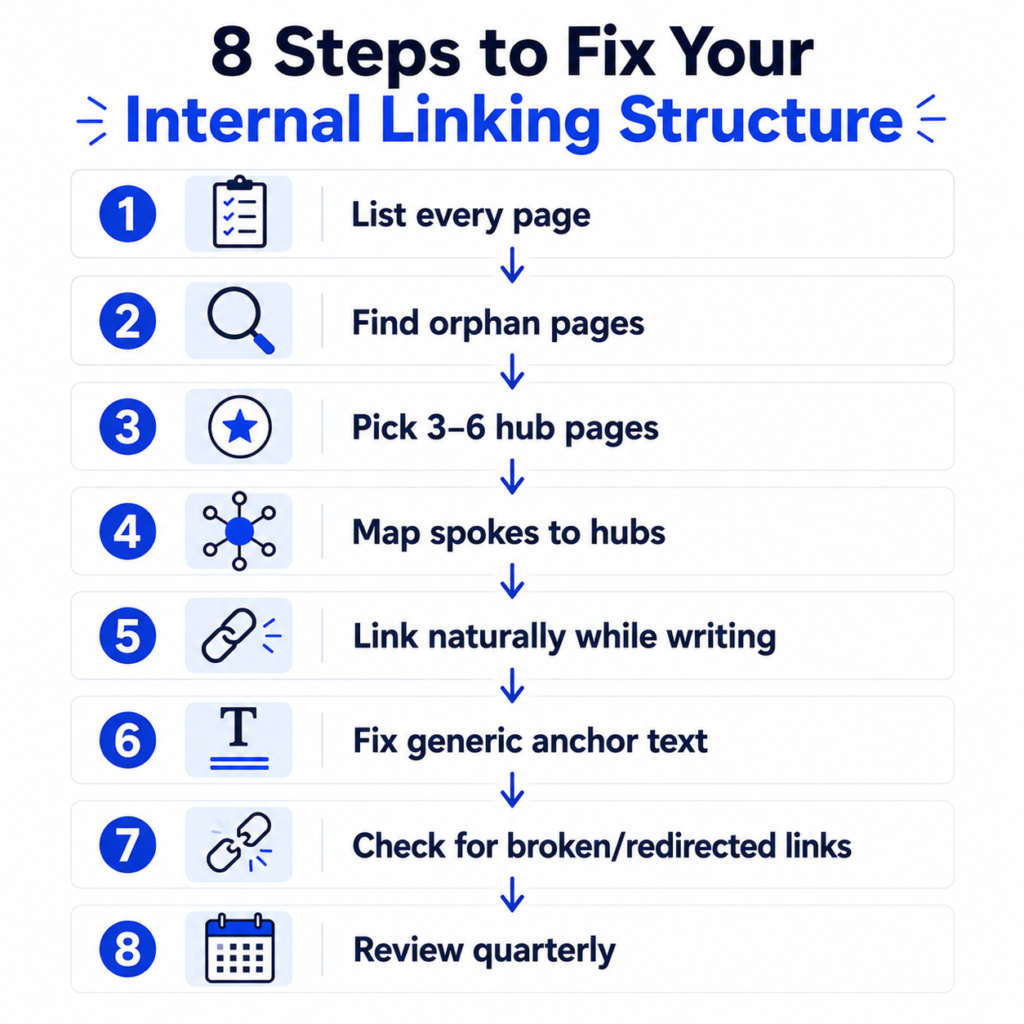
Here’s the process I’d actually run on a small site, in order.
1. List every page you have. Pull a full list of URLs. If you don’t already have a sitemap handy, a sitemap URL extractor can generate one from your XML sitemap in a couple of minutes. For a 20-40 page site, a spreadsheet is genuinely enough. Don’t overthink the tooling here.
2. Identify orphan pages. An orphan page has zero internal links pointing to it. These are shockingly common, especially old blog posts, seasonal landing pages, or pages that got built and then forgotten. A internal link analyzer will show you which of your pages currently have no incoming internal links, so you’re not guessing.
3. Decide your hub pages. Pick 3-6 pages that represent your main topic clusters or service categories. These get the most incoming links and should appear in your main navigation.
4. Map spokes to hubs. For every other page, decide which hub it belongs under. If a page doesn’t fit under any hub, ask whether it should exist at all, or whether it needs to link back to your homepage and one or two closely related pages at minimum.
5. Add contextual links while you write, not after. The strongest internal links are the ones that appear naturally inside a sentence because the linked page genuinely adds value there. Bolting links onto old content in a rushed afternoon produces awkward, forced anchor text. It’s better to build the habit of linking as you write new content, then do periodic sweeps of older posts.
6. Fix your anchor text. Avoid “click here” and “read more.” Use descriptive text that tells the reader (and Google) what’s on the other end, phrases like “how to calculate CAC” rather than “this article.”
7. Check for broken and redirected internal links. Old permalinks change, tools get renamed, categories get restructured. A quick pass with a redirect generator helps you catch and fix internal links that are quietly pointing at 404s or unnecessary redirect chains, both of which waste crawl equity and frustrate readers.
8. Revisit quarterly. New content changes what should link where. A post you publish this quarter might be the perfect supporting link for something you wrote eight months ago. Set a recurring reminder, this is the step almost everyone skips.
A Realistic Example: Local Service Business
Say you run a small HVAC company with a 25-page website: a homepage, five service pages (AC repair, furnace installation, duct cleaning, etc.), a blog with 15 posts, an about page, and a contact page.
Before any restructuring, the site looked like this: homepage links to the five services and to “blog.” Each blog post links back to homepage only. Services never mention each other. Nine of the fifteen blog posts have no internal links pointing to them at all.
After a cleanup:
- The five service pages became hubs, each with its own dedicated navigation entry.
- Every blog post got mapped to the one or two services it’s most relevant to, then linked from that service page under a short “helpful reading” section.
- Blog posts that share a topic (say, three different posts about furnace maintenance) started linking to each other where it made sense in the text.
- Nine orphan posts each received two to three internal links from related content.
Nothing about the content itself changed. Three months later, the previously orphaned posts started appearing in search results for long-tail queries they’d never ranked for, and average pages-per-session on the site increased noticeably, because visitors reading one service page now had an obvious next page to click instead of a dead end.
That’s a fairly typical outcome. Restructuring internal links doesn’t create new content or new authority out of nothing, but it stops you from wasting authority you already have.
How Many Internal Links Is Too Many
You’ll find a range of numbers if you search this. Some guidance suggests roughly 2-5 contextual links per 1,000 words, other sources land closer to one link every 200-300 words. Treat any specific number as a loose guideline, not a rule to hit exactly.
What matters more than the count is the reason behind each link. A useful gut check for any page:
| Signal | What it usually means |
| A link exists because it helps the reader understand or take the next step | Keep it |
| A link exists mainly to hit a quota or push keyword-rich anchor text | Remove or rework it |
| The same three links appear in every single blog post | You’re diluting their value, vary them |
| A page has 40+ links crammed into thin content | Almost certainly too many, thin the page or split it |
For a typical 1,200-1,800 word blog post, somewhere between four and ten genuinely relevant internal links is a reasonable range for most small sites. Long, in-depth guides can reasonably carry more.
Common Mistakes on Small Sites
Linking only from the homepage. If your homepage is the only page doing any linking, you’ve built a wheel with no spokes connecting to each other. Pages need to link sideways too, not just up to the homepage.
Using the exact same anchor text every time. If every internal link to your pricing page says “pricing,” that’s not necessarily wrong, but it’s a missed opportunity. Natural variation (pricing plans, how much it costs, compare plans) reads better and gives Google more context about the page.
Forgetting to link to brand-new content. Publishing a post and never linking to it from anything else is one of the most common reasons new pages take months to get indexed and ranked, when a few links from related older posts would have helped it along immediately.
Treating navigation menus as the whole strategy. Nav links matter, but they’re identical on every page, which limits how much unique context they can provide. In-content links, the ones inside your paragraphs, carry more topical signal because they appear in context.
Ignoring your own tool or resource pages. If your blog explains a concept and you have a calculator or tool that helps apply it, not linking to that tool is a missed opportunity for both the reader and your own site’s internal structure. A post about ROAS should probably mention the ROAS calculator somewhere it’s genuinely useful, not just tacked onto the end.
A Simple Internal Linking Checklist
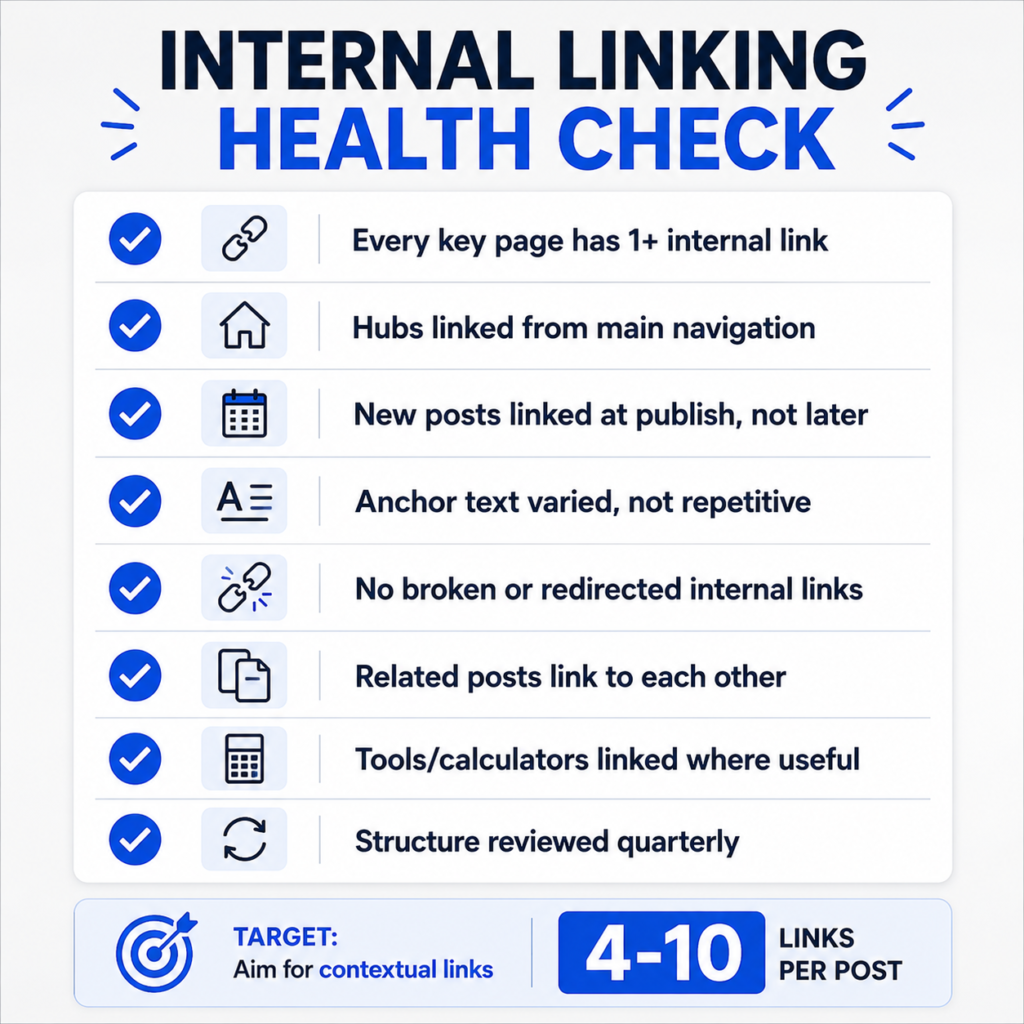
- [ ] Every important page has at least one internal link pointing to it
- [ ] Hub pages are identified and linked from main navigation
- [ ] New content gets 2-5 internal links added at publish time, not months later
- [ ] Anchor text is descriptive and varied, not repetitive
- [ ] No internal links point to broken URLs or unnecessary redirects
- [ ] Related blog posts link to each other, not just back to a hub
- [ ] Blog posts mention relevant tools or calculators where genuinely useful
- [ ] Structure gets reviewed at least once a quarter
Tools That Make This Easier
You don’t need enterprise software to run a solid internal linking audit on a small site, but a few tools remove a lot of manual guesswork:
- An internal link analyzer to spot orphan pages and see your current link distribution
- A sitemap URL extractor to get a full, current list of your pages
- An H1-H6 extractor to review your heading structure while you’re deciding which pages are true hubs
- A table of contents generator for long guides, which itself creates useful jump links within the page
- A redirect generator for cleaning up any internal links pointing to outdated URLs
- A canonical URL generator if restructuring content has left you with near-duplicate pages competing for the same links
You’ll find the full list under SEO tools if you want to browse what else might fit your workflow, or check the all tools page for the broader catalog.
Internal linking is one of the few SEO levers a small site owner controls completely, no algorithm updates to wait on, no outside sites to convince. Set aside an afternoon, run through the checklist above, and you’ll likely find pages on your own site that have been sitting one link away from performing a lot better than they are right now.
If you want more structural and technical SEO breakdowns like this one, the QuickMarketingTools blog covers related topics regularly, and you can always suggest a tool if there’s something specific that would make this kind of audit easier for your site.
Frequently Asked Questions
Does internal linking actually affect rankings?
Not as a single standalone ranking factor the way backlinks are often described, but internal links directly influence crawling, indexing speed, and how clearly Google understands your site’s topical structure, all of which affect rankings indirectly and, in practice, quite meaningfully.
How many internal links should one blog post have?
There’s no exact official number. A reasonable range for most posts is somewhere between four and ten contextual links, chosen because they genuinely help the reader, not to hit a quota.
What’s an orphan page and why does it matter?
An orphan page has no internal links pointing to it from anywhere else on your site. It’s harder for both users and search engines to find, and it often gets crawled less frequently or misses out on ranking potential entirely.
Should I link to the same page twice from the same article?
Generally, once is enough. Linking to the same destination repeatedly in one article rarely adds value for the reader and can look manipulative to search engines.
Do internal links pass the same authority as backlinks?
No. External backlinks from other domains typically carry more weight for authority signals. Internal links matter for a different reason, they shape crawl paths, distribute the authority your site already has more evenly, and clarify topical relationships between your own pages.

2 thoughts on “Internal Linking for Small Websites”
Comments are closed.