If you’ve opened Schema.org’s list of item types and immediately closed the tab, you’re not alone. There are over 800 schema types documented there, but Google only rewards a fraction of them with actual visual changes in search results. Picking the wrong one wastes development time. Picking none at all leaves easy wins on the table. This guide walks through exactly how to figure out which schema markup fits your site, based on what Google currently supports – not what worked three years ago.
Quick Answer: Match Your Schema To Your Page Type, Not Your Industry
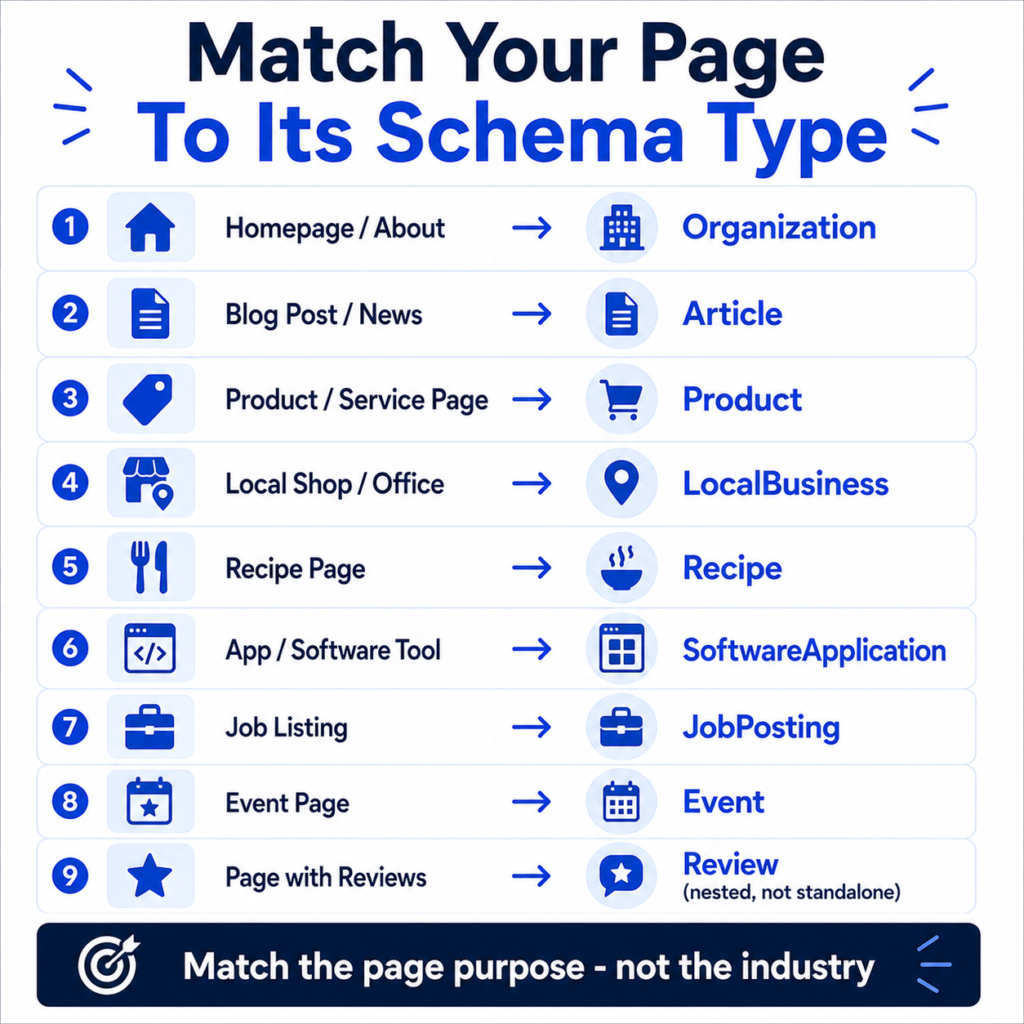
Most confusion around schema comes from a simple mistake – people pick schema based on what kind of business they run instead of what kind of page they’re marking up. A SaaS company doesn’t need one “SaaS schema.” It needs Organization schema on the homepage, Article schema on blog posts, Product or SoftwareApplication schema on the pricing page, and possibly FAQPage-style content handled as plain HTML instead (more on why below).
Here’s the fast version:
| If your page is… | Use this schema |
| Your homepage or about page | Organization |
| A blog post or news piece | Article (or BlogPosting) |
| A product or service page | Product |
| A local shop, clinic, or office | LocalBusiness |
| A recipe | Recipe |
| An app or software tool | SoftwareApplication |
| A job listing | JobPosting |
| An event | Event |
| A page with customer reviews | Review / AggregateRating (nested, not standalone) |
If your page doesn’t match any of these cleanly, it probably doesn’t need schema at all – and that’s fine. Not every page benefits from structured data, and forcing it onto content that doesn’t fit tends to trigger Search Console warnings rather than rich results.
Why This Decision Actually Matters
Structured data isn’t a ranking factor. Google has said this directly and repeatedly. What it does is make your page eligible for a richer appearance – a star rating, a price, a byline photo, a logo in a knowledge panel. That richer appearance is what tends to move click-through rate, and click-through rate is one of the few SEO levers you can pull without waiting months for a ranking change to take effect.
There’s a second reason this matters more in 2026 than it did a couple of years ago. Google trimmed its supported schema list in two passes – one in mid-2025 that removed types like Course Info, Estimated Salary, Learning Video, Special Announcement, and Vehicle Listing, and a smaller cleanup in January 2026 that dropped Practice Problem from Search Console’s rich result reporting. Google also confirmed that Dataset schema only feeds Google’s separate Dataset Search tool, not regular search results – a detail that trips up a surprising number of data-heavy sites. If you’re marking up your site based on a tutorial from 2023, there’s a real chance part of that markup no longer does anything.
There’s a third, quieter reason. Marking up your content accurately – even the parts that don’t produce a visible rich result – helps machines parse what a page is actually about. As AI answer engines and Google’s own AI features rely more on entity understanding, clean schema is part of how your content gets described correctly, even when there’s no star rating attached to the payoff.
Start By Asking What Google Actually Rewards Right Now
Before picking a schema type, check whether it still triggers anything visible. Google’s currently supported list (per its official Search Gallery documentation) includes: Article, Breadcrumb, Carousel, Course list, Dataset, Discussion forum, Education Q&A, Employer aggregate rating, Event, Image metadata, Job posting, Local business, Math solver, Movie, Organization, Product, Profile page, Q&A, Recipe, Review snippet, Software app, Speakable, Subscription/paywalled content, Vacation rental, Book actions, Fact check, and Video.
Notice what’s missing from that list: FAQPage and HowTo. Google restricted both of these significantly back in 2023, limiting FAQ rich results to a narrow set of authoritative government and health sites and removing the two-step HowTo accordion from most search results entirely. If you’ve been adding FAQPage schema to every blog post hoping for extra SERP real estate, it’s worth knowing that for the overwhelming majority of sites, that markup is no longer doing what it used to. It won’t hurt you, but it won’t help you either – the JSON-LD just sits there unused. That doesn’t mean FAQ-style content is worthless; it can still be genuinely useful for readers and may help AI systems understand a page’s structure. Just don’t expect a visual reward for it anymore.
The Core Schema Types Worth Your Time
Not every business needs every type below. Pick based on what a page actually is.
Organization Schema
This is close to mandatory for any business site. It tells Google your legal name, logo, address, contact details, and social profiles, and it feeds knowledge panel data and site name attribution in search results. Place it site-wide, usually on the homepage, and keep it in sync if your business details change.
Article / BlogPosting Schema
For blog content, news, and long-form editorial pages. It supports headline, publish date, author, and publisher information, and it can improve how your article appears with larger images and clearer bylines. If your site runs a blog – which, if you’re reading this, it probably does – this is one of the highest-leverage schema types you can implement, because it applies to every post you publish going forward.
Product Schema
For anything with a price, availability status, or SKU. This is the schema behind the star ratings, price ranges, and “in stock” labels you see under product listings in search. If you run an ecommerce store, this is not optional – it’s close to table stakes for competing in shopping-related search results.
LocalBusiness Schema
For any business with a physical location or a defined service area – a clinic, a restaurant, a law firm, a home services company. It powers the address, hours, and contact details that show up in local search and Maps-adjacent results. Pair it with consistent NAP (name, address, phone) data across your site and directory listings; inconsistency here undermines the schema’s usefulness more than missing schema altogether.
Review Snippet Schema
This isn’t a standalone type – it’s nested inside Product, LocalBusiness, Recipe, Movie, Software App, or Book schema to add star ratings. Google has gotten stricter about self-serving reviews here; the reviews need to be genuine, sourced from actual customers, and ideally verifiable, not aggregated marketing copy dressed up as ratings.
SoftwareApplication Schema
For SaaS products, mobile apps, and downloadable tools. It supports category, operating system, pricing, and rating information, and it’s what lets a software listing show a star rating directly in search results the way an app store listing would.
JobPosting Schema
If you post open roles on your own site rather than only through a job board, this schema type is what makes those listings eligible for Google’s job search experience, which draws meaningfully more traffic than a standard blue link for that kind of query.
Event Schema
For webinars, conferences, in-person meetups, or product launches with a set date and location. It supports the event carousel format in search results, which is genuinely useful for anything time-sensitive.
Real-World Scenario: How Three Different Businesses Should Choose
A mid-size SaaS company with a marketing site, a blog, and a pricing page shouldn’t try to pick “one” schema. The homepage gets Organization schema. Every blog post gets Article schema with author and date fields populated correctly. The pricing page gets SoftwareApplication schema with actual pricing tiers reflected in the markup, not a single generic price. If the company runs customer testimonials on the pricing page, those get wrapped in Review schema nested under the SoftwareApplication entity – not floated as a separate, disconnected block.
A DTC ecommerce store selling skincare products needs Product schema on every product page, with accurate price, currency, and availability fields kept current through whatever platform feeds the site (Shopify apps and WooCommerce plugins both handle this reasonably well, though it’s worth spot-checking the output). Category and collection pages generally don’t need Product schema themselves – that belongs on individual product pages. The homepage still gets Organization schema, and if the brand runs a blog for content marketing, those posts get Article schema.
A local marketing agency with one office and a handful of service pages should lead with LocalBusiness schema on the homepage and contact page, keep NAP details identical to their Google Business Profile, and use Article schema on their blog. If they publish case studies as standalone pages rather than blog posts, Article schema still fits reasonably well there too.
A Simple Decision Process

- Identify the page’s primary purpose. Is it selling something, informing someone, listing a business detail, or promoting an event?
- Match that purpose to the closest schema type from the list above – don’t force a type that’s a loose fit just because it seems more “advanced.”
- Check whether the type is still actively supported using Google’s Rich Results Test before investing development time.
- Implement in JSON-LD, not Microdata or RDFa. Google explicitly recommends JSON-LD because it lives in a separate script block and doesn’t require touching your visible HTML, which also makes it far less likely to introduce rendering bugs.
- Validate, then monitor. Structured data errors show up quietly in Search Console’s Enhancement reports, often weeks after a template change broke something. A quarterly check is a reasonable habit.
If you’d rather not hand-write JSON-LD from scratch, the schema markup generator builds valid markup for the common types without requiring you to memorize field names or nesting rules.
Common Mistakes When Choosing Schema
Marking up content that isn’t visible on the page. Google’s guidelines are explicit that structured data should describe what a user can actually see. Adding review ratings that don’t appear anywhere in the visible page content is a policy violation, not just a best practice miss, and it can lead to manual actions.
Using FAQPage or HowTo schema and expecting the old rich results. As covered above, both have been restricted or lost most of their visual reward. Keep FAQ-formatted content if it genuinely helps readers, but don’t build a content strategy around the assumption that the schema will earn extra SERP space.
Stacking too many schema types on one page without a clear primary entity. A page can have multiple schema blocks, but Google needs to understand which one represents the main content. Product schema competing with Article schema on the same page, both trying to be the “main” entity, tends to confuse rather than help.
Copying a competitor’s schema wholesale. Structured data should reflect your actual page content and data. Reusing someone else’s template often means shipping fields – like their business hours or their product’s aggregate rating count – onto your own page by accident.
Letting schema go stale. Price changes, closed locations, or discontinued products need to be reflected in the markup too. Static schema that was correct at launch and never touched again eventually reports inaccurate information to Google, which erodes trust in your site’s data over time.
Testing And Validating Your Markup
Google’s Rich Results Test is the primary tool for checking whether a specific URL is eligible for the rich result you’re targeting – it’ll flag both errors (which block eligibility) and warnings (which don’t block eligibility but indicate missing recommended fields). Search Console’s Enhancements section gives you the aggregate, ongoing view across your whole site, which is more useful for catching regressions after a template or CMS update than one-off spot checks.
It’s also worth running your titles and meta descriptions through a meta title and description checker alongside your schema audit, since rich results and standard snippets work together to shape how a listing looks in search – and previewing the combined appearance with a SERP snippet preview tool can save you from surprises after publishing.
Does Schema Markup Directly Improve Rankings?
No, and Google has been consistent about this for years. What it does is expand what your listing can show – stars, prices, images, business details – which tends to influence click-through rate rather than position. If you’re trying to understand how CTR shifts actually affect your traffic, a CTR calculator can help you model what even a modest rich-result-driven CTR lift is worth across your existing impression volume.
Should You Use Multiple Schema Types On The Same Page?
Yes, when they genuinely apply. A product page commonly carries Product schema plus a nested Review/AggregateRating block plus Breadcrumb schema for navigation context. What you want to avoid is layering in types that don’t reflect the page’s actual content just because you’ve heard “more schema is better.” It isn’t – accurate schema is better.
Keeping Schema Consistent As Your Site Grows
Schema tends to break quietly during redesigns, CMS migrations, or when a developer edits a template without realizing structured data lives inside it. A few habits help:
- Store schema logic in reusable templates rather than hardcoding it on individual pages, so updates propagate automatically.
- Re-run the Rich Results Test after any template or theme change, not just at launch.
- Keep your heading structure clean alongside your schema – tools like an H1-H6 extractor can help you confirm your page hierarchy still matches what your Article or Product schema claims about the content.
- If you’re restructuring URLs at the same time, run them through a canonical URL generator so your schema’s URL fields don’t end up pointing at outdated paths.
Frequently Asked Questions
Do I need schema markup for a small business website
If you have a physical location or serve a defined area, LocalBusiness schema is worth the relatively small setup effort. It directly supports how your business appears in local search results, and unlike some other schema types, it hasn’t been deprecated or restricted.
Is JSON-LD the only format Google accepts?
No, Google also supports Microdata and RDFa, but it explicitly recommends JSON-LD because it’s easier to implement, easier to validate, and doesn’t require modifying your page’s visible HTML.
Can schema markup hurt my SEO if I get it wrong?
Minor errors (missing recommended fields) generally just mean you miss out on the enhanced appearance – they don’t penalize the page. Marking up content that’s misleading or not actually present on the page can trigger a manual action under Google’s structured data guidelines, so accuracy matters more than completeness.
What happens if I use a deprecated schema type like FAQPage?
Nothing negative happens to your rankings. The markup is simply ignored for rich result purposes. It’s not worth removing urgently, but it’s also not worth investing new development time in going forward.
How do I know which schema type fits a page that doesn’t clearly match a category?
Default to the most specific type that accurately describes the primary content. If nothing fits well, it’s reasonable to skip structured data on that page rather than force an inaccurate label onto it.