Most sites that struggle to rank aren’t short on content. They’re short on structure. You’ll find a dozen articles on the same broad subject, each one competing with the others instead of supporting them, and none of them ever gets treated as the definitive answer. The pillar and cluster model exists to fix exactly that problem. Below is a practical breakdown of what each type of page actually does, how they work together, and where teams tend to get the model wrong.
Quick Answer
A pillar page is one broad, comprehensive page that covers an entire topic at a high level and links out to related subtopics. A cluster page is a focused, narrower article that covers one piece of that topic in depth and links back to the pillar where useful. Together, they form a “hub and spoke” structure that can make a site’s topical coverage easier for readers and search engines to understand.
Pillar Pages vs Cluster Pages: The Core Difference
Think of the pillar page as the table of contents for an entire subject, and the cluster pages as the chapters.
If your site covers email marketing, the pillar page would be something like “Email Marketing: The Complete Guide,” touching on strategy, tools, deliverability, segmentation, and automation at a summary level. It would never go deep enough to fully answer “how to fix low email deliverability” – that’s a job for a cluster page.
The cluster page on deliverability would go deep. Specific causes, specific fixes, specific numbers. It would link back up to the pillar, and the pillar would link down to it, along with every other cluster in that topic.
Neither page is “better.” They’re built to do different jobs, and a topic cluster only works when both jobs get done well.
What Is a Pillar Page
A pillar page is a broad, authoritative piece of content built to cover a core topic comprehensively enough that it becomes the anchor for everything related to it on your site. It’s usually the page you’d want someone to land on if they typed in the broadest possible version of your topic.
Characteristics of a strong pillar page:
- Covers the topic at a summary level, not exhaustively – depth belongs to the clusters
- Targets a broad, high-volume head term (for example, “content marketing” rather than “how to write a content calendar”)
- Links out to every cluster page that supports it
- Gets updated regularly as new clusters are added underneath it
- Is structured with clear headings so both readers and crawlers can scan it fast
One thing worth being honest about: pillar pages take real effort to maintain. A pillar that links to eight cluster pages needs updating every time a new cluster launches, or the whole structure starts to look neglected. Treat it as a living document, not a one-time project.
What Is a Cluster Page
A cluster page (also called a spoke page or subtopic page) is a focused article that answers one specific question or covers one specific subtopic tied to a pillar. It’s where the real depth lives.
Characteristics of a strong cluster page:
- Targets a narrower, often longer-tail keyword with clearer search intent
- Answers one question thoroughly rather than several questions shallowly
- Links back to its pillar page with descriptive anchor text
- Links sideways to other relevant clusters when it genuinely helps the reader
- Can rank on its own, independent of the pillar, if the intent match is strong
A well-built cluster page doesn’t need the pillar to succeed. It should be able to stand on its own for its specific keyword. What the pillar structure adds is context – it tells search engines and readers where that one narrow answer fits inside the bigger picture.
How the Pillar-Cluster Model Works Together
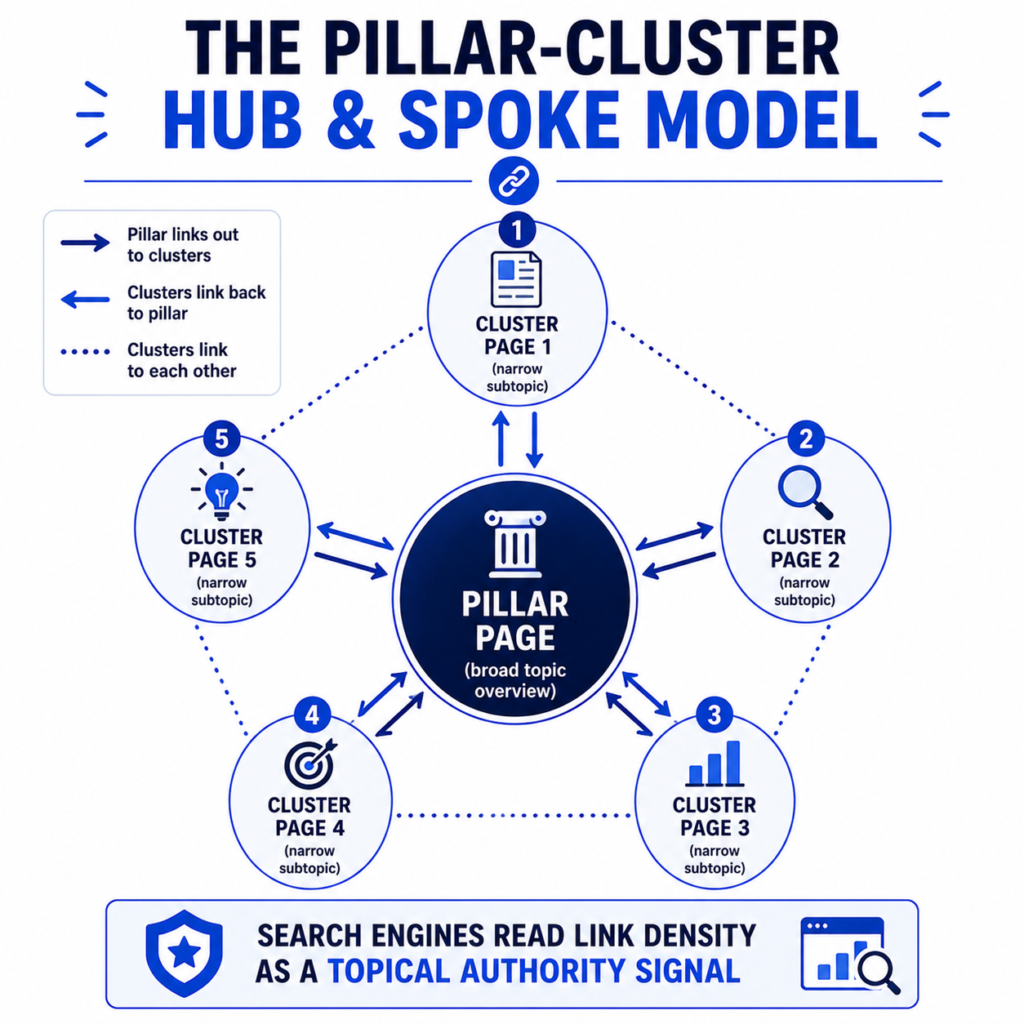
The mechanics are fairly simple, even though the strategy behind them isn’t always obvious at first.
- The pillar page targets a broad topic and briefly covers every subtopic within it.
- Each subtopic gets its own dedicated cluster page that goes deep.
- Every cluster page links back to the pillar.
- The pillar links out to every cluster.
- Related clusters link to each other where it’s genuinely useful for the reader, not just for link count.
This creates a dense internal linking pattern around one subject instead of a scattering of disconnected posts. Search engines read that density as a signal – it suggests the site has real depth on the topic rather than a single lucky article that happened to rank. If you want to see how link-dense your current pages actually are, the internal link analyzer is a fast way to check where the gaps sit before you start building out a cluster.
Pillar Pages vs Cluster Pages: Side-by-Side Comparison
| Factor | Pillar Page | Cluster Page |
| Scope | Broad, covers the whole topic | Narrow, covers one subtopic |
| Typical length | Long-form, comprehensive overview | Focused, as long as the topic needs |
| Keyword target | Head term, high search volume | Long-tail, specific intent |
| Search intent | Often informational/navigational | Informational, transactional, or comparison |
| Update frequency | Regularly, as new clusters launch | As needed for accuracy |
| Internal links | Links out to all related clusters | Links back to pillar and sideways to related clusters |
| Job | Organizes broad topical coverage | Answers specific search intent in more depth |
| Example | “Email Marketing: The Complete Guide” | “How to Fix Low Email Deliverability” |
A Realistic Example: How This Plays Out for a SaaS Company
Say a SaaS company sells project management software and wants to build authority around “project management.” Instead of writing one giant article and hoping it ranks for everything, they’d structure it like this:
Pillar page: “Project Management: The Complete Guide for Growing Teams”
Supporting cluster pages:
- “Agile vs Waterfall: Which Project Management Method Fits Your Team”
- “How to Run a Project Kickoff Meeting”
- “Project Management KPIs Every Team Should Track”
- “Gantt Charts vs Kanban Boards Explained”
- “How to Estimate Project Timelines Accurately”
Each cluster page targets its own search intent and can bring in traffic on its own. But together, they tell search engines something the individual pages can’t say alone: this site actually knows project management, from the fundamentals through the edge cases. That’s the compounding effect the model is built for – individual articles rarely move the needle the way a connected cluster does.
A Realistic Example: How an Agency Might Apply This for a Client
An agency working with an ecommerce client selling skincare products might build a pillar around “Skincare Routine Guide” with clusters covering “morning vs night skincare routine,” “how to layer skincare products,” “skincare for sensitive skin,” and “how often should you exfoliate.” Each cluster funnels relevant, warmed-up traffic toward the pillar, which can then link to product category pages. The pillar becomes the connective tissue between top-of-funnel content and the commercial pages that actually drive revenue – without turning every blog post into a sales pitch.
When to Use a Pillar-Cluster Structure
This model works best when:
- You’re targeting a broad topic with enough depth to support 6 or more subtopics
- Your audience searches with a mix of broad and specific queries around the same subject
- You’re trying to build a clear, durable resource around a subject, not just publish one isolated article
- You have (or plan to have) enough content volume to actually fill out the clusters
When Not to Use It
The model isn’t free, and forcing it onto a topic that doesn’t need it usually backfires. Skip it when:
- The topic is narrow enough that one solid article already covers it completely
- You don’t have the resources to maintain multiple interlinked pages over time
- You’re publishing a single time-sensitive piece, like a news update or event recap
- The subtopics you’d create don’t have distinct enough search intent – if two cluster ideas would basically say the same thing, they’ll compete with each other instead of supporting the pillar
A half-built cluster with three thin spokes and no updates often performs worse than a single well-researched standalone article. If you’re not sure whether your planned clusters have distinct enough intent, running them through a keyword intent checker before you start writing can save a lot of wasted effort later.
Common Mistakes With Pillar and Cluster Pages
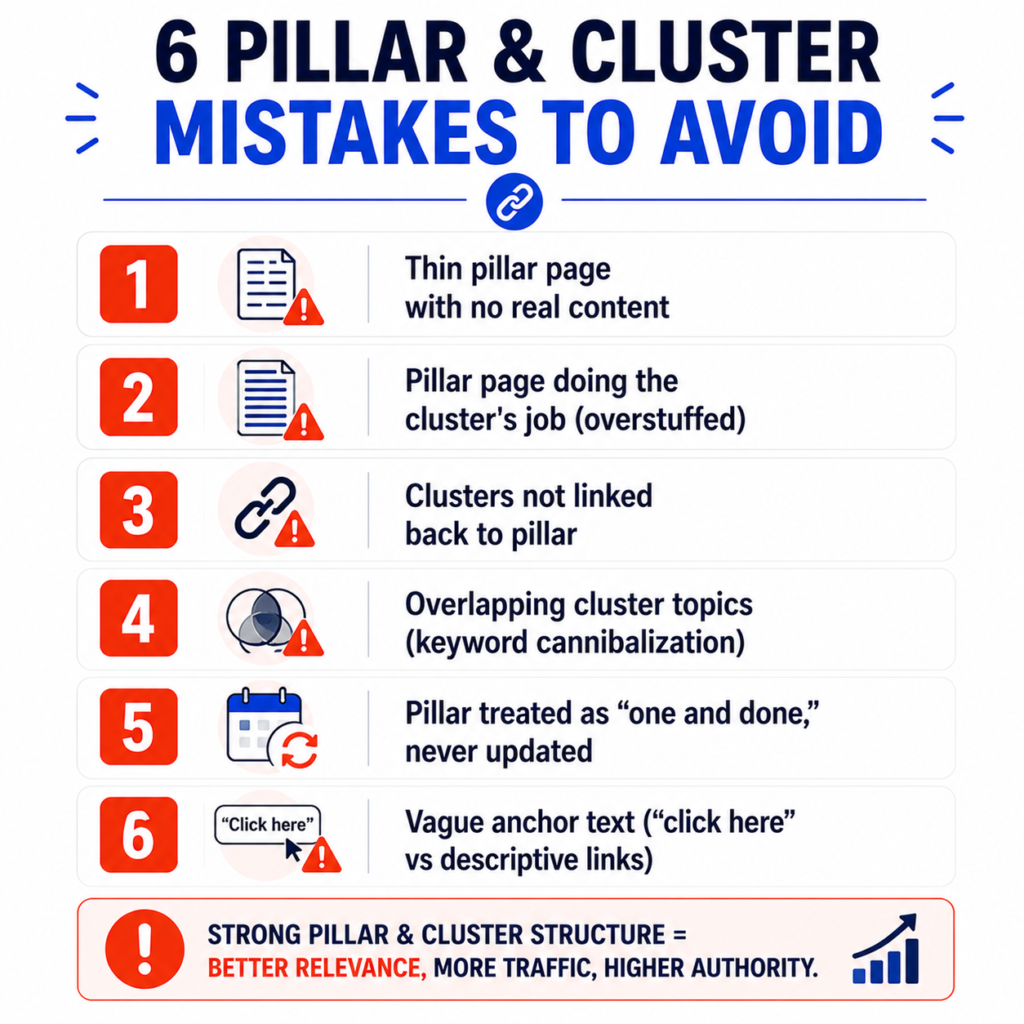
Making the pillar page too thin. A pillar that’s basically a bulleted list of links with no real content of its own is not very useful. It needs to answer the broad question well enough to help someone even if they never click through to a single cluster.
Making the pillar page try to do the cluster’s job. The opposite problem is just as common – cramming full explanations into the pillar until it’s 6,000 words of everything. That usually just creates competition between the pillar and its own clusters for the same keywords.
Forgetting to link clusters back to the pillar. This is the step that makes the structure understandable. A pillar with no relevant links from its clusters is just a long article, not a hub.
Overlapping cluster topics. If two cluster pages are answering close to the same question, they cannibalize each other’s rankings instead of expanding coverage. Before publishing a new cluster, check whether an existing page already covers that intent.
Treating the pillar as a one-time project. Pillars decay. New subtopics emerge, data changes, and competitors publish more thorough content. A pillar that hasn’t been touched in a year usually isn’t doing its job anymore.
Using vague anchor text. Linking with “click here” or “read more” instead of descriptive phrases weakens the relevance signal between pillar and cluster. Anchor text should describe what the linked page actually covers.
How to Build a Pillar-Cluster Content Structure: Step by Step
- Pick a broad topic with real depth. It should be big enough to support at least six to eight distinct subtopics without forcing it.
- Map out the cluster topics first. List every question, comparison, and how-to a reader would search around that topic. Group them by search intent so you’re not duplicating coverage.
- Outline the pillar page around those clusters. Each section of the pillar should summarize one cluster topic and link out to the full article covering it.
- Write or audit the cluster pages. Each one should stand on its own as a complete answer to its specific query, not a thin stub written just to fill a slot.
- Build the internal linking pattern. Pillar links to every cluster. Every cluster links back to the pillar. Related clusters link to each other where relevant.
- Track performance at the cluster level, not just page by page. Combined organic traffic across the whole cluster tells you more about whether the structure is working than any single page’s numbers.
- Revisit and expand. Add new clusters as new questions emerge, and update the pillar to reference them.
If you’re mapping this out for a client or your own site, an editorial checklist helps keep the intent, outline, and internal links consistent across every cluster page – our marketing report template and marketing KPI dashboard are useful for tracking how a cluster performs once it’s live, and the table of contents generator makes long pillar pages easier to scan.
Pillar Pages, Cluster Pages, and AI Search
One thing that’s changed in the last couple of years: content now appears in more surfaces than traditional blue-link results. A clear cluster can give readers, search engines, and answer systems more context about how related pages fit together. That does not guarantee inclusion in AI-generated answers, but it is another reason to make topic coverage coherent instead of publishing isolated posts.
Where This Fits Into Your Broader SEO Strategy
Pillar and cluster pages don’t work in isolation from the rest of your site’s technical SEO. Clean URL structures, sensible internal linking limits, and proper schema markup all support the same goal – helping search engines understand how your content connects. If you’re building out a new cluster, it’s worth double-checking your URL slug generator output for consistency across pages, reviewing how many internal links per page makes sense for a pillar with a lot of outbound links, and applying schema markup so search engines have an easier time parsing the relationship between your pillar and its clusters. It’s also worth reading up on informational vs transactional keywords before mapping out cluster topics, since mismatched intent is one of the most common reasons clusters underperform.
For more tools to plan, structure, and audit your content, browse the full SEO tools collection or check out all tools on QuickMarketingTools. And if there’s a tool you wish existed for this kind of content planning, you can always suggest a tool.
Sources and Methodology
This article describes pillar and cluster pages as an editorial organization model, not a Google-mandated ranking system. Google-specific guidance is grounded in the helpful content guidance, the SEO starter guide, and Google’s documentation on crawlable links.
Frequently Asked Questions
Do I need a pillar page for every cluster page I write?
No. Not every article needs to belong to a cluster. Standalone posts that answer a specific, self-contained question are fine on their own. Pillars make sense once you have enough related content on a broad subject that grouping it improves both usability and SEO.
How long should a pillar page be?
There’s no fixed number, but pillar pages tend to run longer than a typical blog post because they’re summarizing an entire topic. What matters more than word count is whether it genuinely covers every major subtopic and links to the content that goes deeper.
Can a cluster page outrank its own pillar page?
Yes, and that’s normal. Cluster pages may perform better for specific long-tail searches because the cluster is a more precise match for that exact intent. The pillar’s job is broad coverage and navigation, not necessarily the top spot for every query.
How many cluster pages does a pillar need?
It depends on the topic and your resources. A handful of well-researched clusters will outperform a large number of thin ones. Start with the subtopics that have the clearest search intent and expand from there.


1 thought on “Pillar Pages vs Cluster Pages Explained”
Comments are closed.