Readability is one of those things nobody notices until it’s missing. A visitor lands on your page, reads two sentences, and either keeps going or bounces back to Google. Most of the time, that decision has nothing to do with your product or your offer. It’s about whether the content was easy to follow.
This guide covers what readability actually measures, why it affects both rankings and conversions, and the specific changes that move a readability score in the right direction without watering down your message.
What Readability Actually Measures
Readability scores estimate how difficult a piece of text is to read, based on factors like sentence length, word length, syllable count, and paragraph structure. The most common formulas are Flesch Reading Ease, Flesch-Kincaid Grade Level, and Gunning Fog. They all work on the same basic principle: shorter words and shorter sentences are easier to process than long, dense ones.
A Flesch Reading Ease score of 60-70 is generally considered accessible to most adults. Anything above 80 reads like a children’s book. Anything below 30 reads like a legal contract or an academic paper. For a marketing blog, business page, or product description, you want to land somewhere between 55 and 75 in most cases – clear enough for a broad audience, but not so simplified that it feels dumbed down.
It’s worth being honest about a limitation here: readability formulas don’t measure whether content is good. They measure sentence mechanics. You can write a grammatically simple sentence that says nothing useful, and it will still score well. Readability is a floor, not a ceiling. It removes friction so your actual ideas have a chance to land.
Why Readability Affects SEO and Conversions
Google has never confirmed a direct ranking factor called “readability.” What it has confirmed, repeatedly, is that content should match user intent and be easy to consume. Readability is the mechanism that makes that possible.
Here’s the practical chain of events. A page with dense, jargon-heavy paragraphs tends to have a higher bounce rate and lower average time on page. Search engines use engagement signals, even imperfect ones, as part of how they evaluate whether a page satisfied a query. If your bounce rate is unusually high compared to similar pages, that’s often a content problem before it’s a technical one – you can check your numbers with a bounce rate calculator to see where you actually stand.
On the conversion side, the connection is more direct. A SaaS pricing page written in dense paragraphs with 30-word sentences forces the reader to work harder to understand what they’re buying. A local service business explaining “our process” in three short paragraphs with a bulleted list will almost always outperform the same information buried in one long block of text. Readers skim before they commit to reading, and if the skim doesn’t give them enough, they leave.
Step-by-Step: How to Improve Website Readability
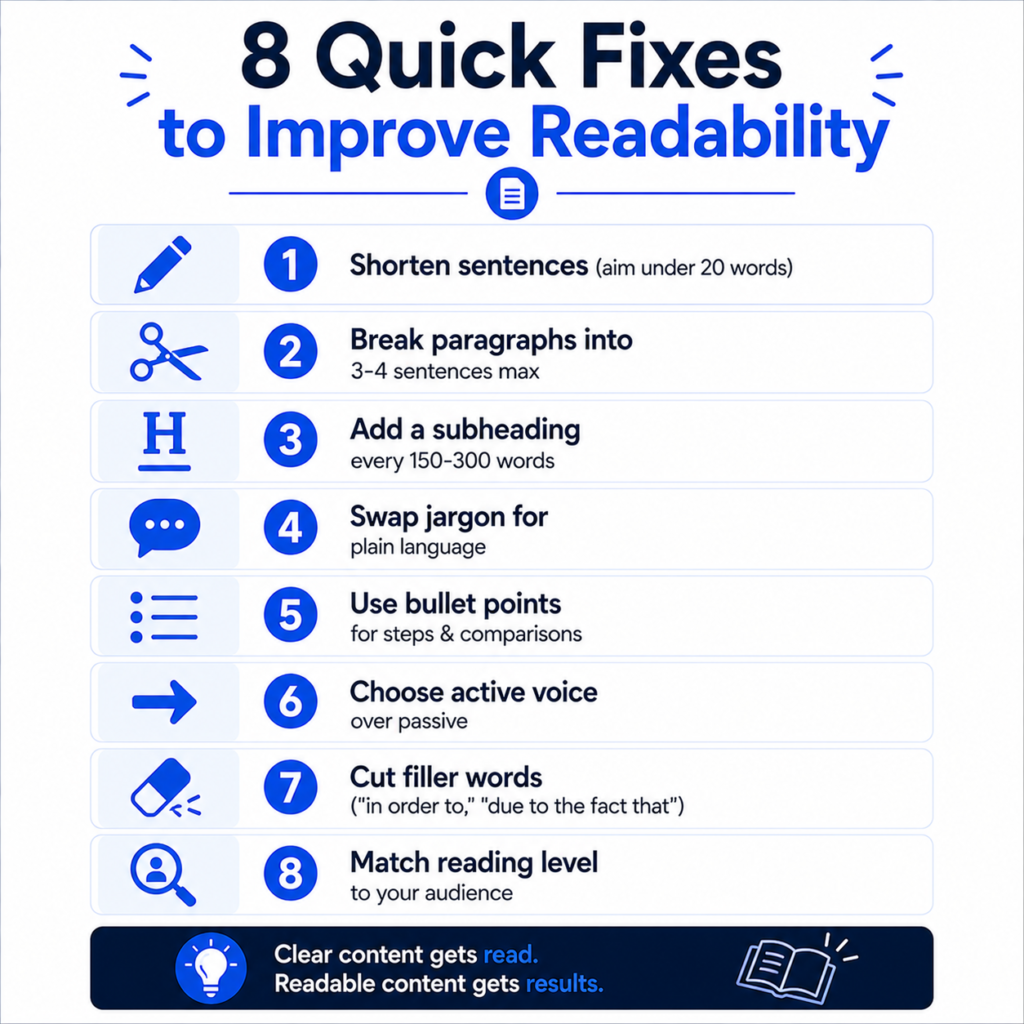
1. Shorten your sentences
Aim for an average sentence length under 20 words. Not every sentence needs to hit that number, variation matters, but if most of your sentences run 25-35 words, readers start losing the thread halfway through.
Before: “Our comprehensive suite of marketing automation tools is designed to help businesses of all sizes streamline their workflows, improve efficiency, and ultimately drive better results across all of their digital marketing campaigns.”
After: “Our marketing automation tools help businesses streamline workflows and get better campaign results. No matter your size.”
Same information. About half the words. Noticeably easier to scan.
2. Break up paragraphs
Three to four sentences per paragraph is a reasonable ceiling for web content. On mobile, a five-sentence paragraph can take up the entire screen, which feels exhausting before the reader even starts.
3. Use subheadings every 150-300 words
Subheadings do two things at once. They help readers scan and find the section relevant to them, and they help search engines understand the structure of your content. If a page has 2,000 words and only one H2 in the middle, that’s a structural problem, not just a readability one. A table of contents generator can also help long-form pages feel navigable instead of overwhelming.
4. Replace jargon with plain language
Every industry has its own shorthand. “Leverage synergies,” “holistic omnichannel approach,” “best-in-class solution.” These phrases mean something to people already inside the industry and almost nothing to everyone else. If you’re writing for a general audience, translate the jargon. If you’re writing for specialists, some technical language is expected and fine – the goal isn’t to eliminate all complexity, it’s to eliminate unnecessary complexity.
5. Use bullet points and numbered lists for sequential or comparative information
If you’re describing steps, options, or comparisons, a list format is almost always easier to process than the same content in prose. Reserve prose for explanation and narrative, and use lists when you’re presenting parallel pieces of information.
6. Favor active voice over passive voice
“The report was reviewed by the team” is passive and adds friction. “The team reviewed the report” is active, shorter, and clearer. Passive voice isn’t wrong, it has its place, but overusing it makes writing feel distant and harder to follow.
7. Cut filler words and redundant phrases
Phrases like “in order to,” “due to the fact that,” “at this point in time,” and “it is important to note that” add length without adding meaning. Cutting them tightens sentences and usually improves the score without changing the message at all.
8. Check your reading level against your actual audience
A financial services firm writing for CFOs can tolerate a higher grade level than a DTC skincare brand writing for first-time buyers. Match the complexity to who’s actually reading, not to an arbitrary target score.
A Realistic Before-and-After Example
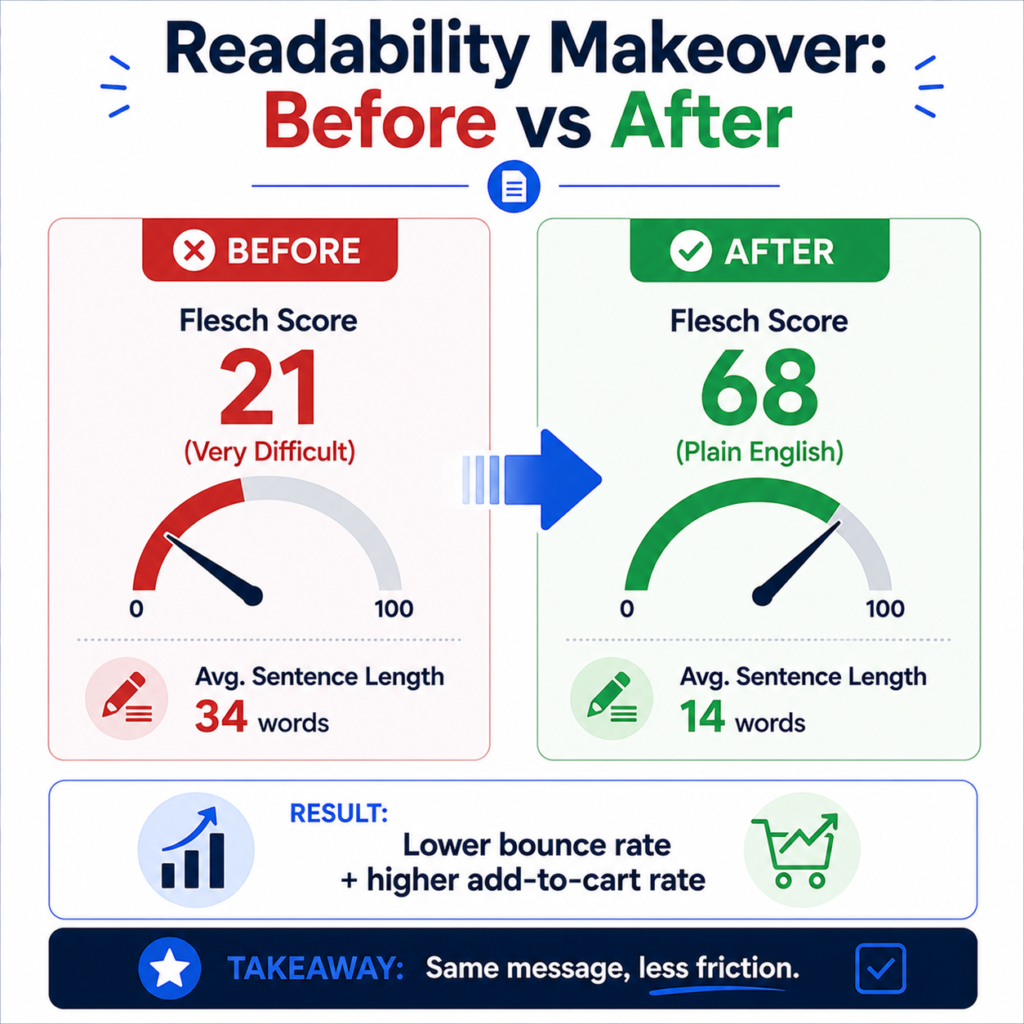
Consider a mid-size ecommerce brand selling home fitness equipment. Their original product description read:
“Our resistance band training system has been meticulously engineered utilizing premium-grade materials in order to facilitate a comprehensive full-body workout experience that caters to individuals across the full spectrum of fitness proficiency levels.”
Flesch Reading Ease score: 21 (very difficult, roughly graduate reading level). Average sentence length: 34 words.
Revised version: “This resistance band set gives you a full-body workout at home. It’s built from durable materials and works for beginners and advanced lifters alike.”
Flesch Reading Ease score: 68 (plain English, roughly 7th-8th grade level). Average sentence length: 14 words.
The brand didn’t lose any information. They lost the friction. After rewriting roughly 40 product descriptions in this style, the brand reported a measurable drop in bounce rate on product pages and a small but consistent lift in add-to-cart rate over the following quarter. That’s not a guaranteed outcome for every business, but it illustrates the pattern: clearer copy tends to keep people on the page longer, and people who stay longer convert more often.
Common Mistakes That Hurt Readability
- Writing for peers, not customers. Marketing teams sometimes write copy that would impress other marketers rather than copy that helps a confused first-time visitor.
- Over-optimizing for keyword density and ignoring flow. Stuffing a target keyword into every sentence, including checking your keyword density to stay in a reasonable range, is worth doing, but it should never come at the cost of natural sentence structure.
- Long intros before getting to the point. If someone has to read three paragraphs before learning what the page is actually about, most will leave before they get there.
- Inconsistent formatting. Random bolding, inconsistent heading levels, and mismatched list styles all add cognitive load, even if the sentences themselves are simple.
- Treating every page the same. A legal disclaimer page and a blog post don’t need the same reading level. Context matters.
How to Check Your Readability Score
You don’t need to calculate this by hand. Run your draft through a readability score checker to get an instant Flesch Reading Ease and grade-level estimate. It’s also worth running a quick sentence counter to see your actual average sentence length, since that single metric drives most of the score. If you’re editing for length limits on top of readability, a character counter is useful for headlines, meta descriptions, and ad copy that need to fit specific constraints.
A practical workflow looks like this:
- Write the first draft without worrying about score at all – get the ideas down.
- Run it through the readability checker to get a baseline.
- Target the longest sentences first. Those usually drag the average down the most.
- Re-check the score after editing.
- Read it out loud once. If you run out of breath mid-sentence, so will your reader.
When a Higher Reading Level Is Actually Fine
Not everything needs to read at a 6th-grade level. A whitepaper for enterprise procurement teams, a technical API doc for developers, or a legal terms page for a B2B SaaS product can sit at a higher grade level without being a problem, because the audience expects and often prefers precision over simplicity. The mistake isn’t having a higher score. The mistake is having a higher score by accident, because nobody checked, rather than by design.
If you’re auditing content across a whole site, pairing readability checks with your broader SEO tools – like an internal link analyzer or a keyword intent checker – gives a fuller picture of why some pages perform better than others. You can find these and more in the full SEO tools collection, or browse the complete tool library for everything else QuickMarketingTools offers.
Frequently Asked Questions
What is a good readability score for a website?
For general consumer content, a Flesch Reading Ease score between 60 and 70 works for most audiences. B2B or technical content can reasonably sit lower, often in the 40-55 range, since the audience expects more domain-specific language.
Does readability directly affect Google rankings?
There’s no confirmed direct ranking factor for readability specifically. It affects rankings indirectly through engagement metrics like time on page and bounce rate, and through Google’s broader emphasis on content that satisfies user intent clearly.
What’s the fastest way to improve a readability score?
Shortening sentences has the biggest single impact. Breaking a 35-word sentence into two shorter ones will move the score more than almost any other single edit.
Can content be too simple?
Yes. If sentences become so short and basic that they lose nuance or sound condescending, that’s a real cost. Readability should reduce unnecessary friction, not strip out useful detail.
Should every page on a website have the same readability target?
No. Match the reading level to the audience and purpose of each page. A homepage and a technical documentation page don’t need to read the same way.