If you’ve ever spent twenty minutes polishing a title tag only to watch Google chop it off with “…” in the search results, you already know why this topic matters. Meta title length isn’t really about counting letters – it’s about understanding how Google renders your title on screen, and writing something that survives that process while still earning the click. Below is everything that actually moves the needle, based on how Google’s own documentation describes the process and how titles behave in real search results.
Quick Answer
Keep your meta title between 50 and 60 characters, or roughly under 600 pixels on desktop. That’s the safest range to avoid truncation for most fonts and most queries. There’s no hard character limit enforced by Google – the real constraint is pixel width, which varies by letter shape, device, and even the search query itself. If you want certainty rather than an estimate, run your title through the meta title and description checker before you publish.
Why Title Length Isn’t Really About Characters
This is the part most articles skip, and it’s the reason so many “60 character” rules feel inconsistent in practice.
Google doesn’t measure your title in letters. It measures it in pixels. A lowercase “i” takes up far less horizontal space than a capital “W,” so two titles with the identical character count can render completely differently. A title built mostly from narrow letters (think “Lisa’s List of Tips”) might fit comfortably at 65 characters, while a title packed with wide capitals (“WHY MARKETING WORKS”) could get cut off at 50.
There’s no limit on how long a title element can be, but the title link is truncated in Google Search results as needed, typically to fit the device width. That single sentence from Google’s own documentation explains almost every confusing thing people notice about title length: why some 65-character titles display fine, why some 55-character titles get cut, and why mobile and desktop sometimes show different lengths for the same page.
Character counts are still useful, just not as a rule – more as a rough proxy that keeps you in a safe zone without having to render every title manually.
The Pixel Width Google Actually Uses
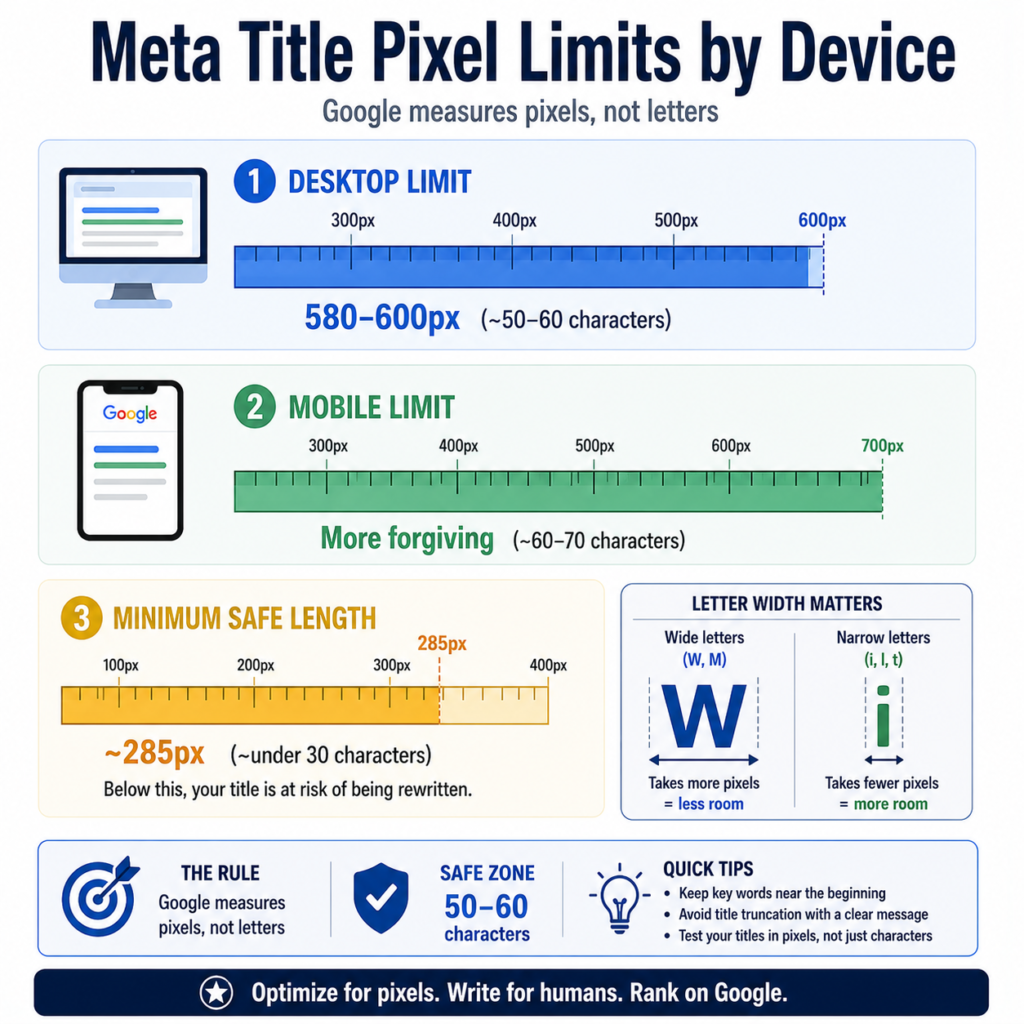
On desktop, Google’s display width for title links sits at approximately 580 to 600 pixels. On mobile, the available space is different (and the device width itself varies by screen size), which is part of why mobile search results sometimes show a longer or shorter version of the same title than desktop does.
Here’s a practical breakdown:
| Device | Approximate Pixel Limit | Approximate Character Safe Zone |
| Desktop | 580-600px | 50-60 characters |
| Mobile | Varies by screen, generally more forgiving | 60-70 characters |
| Minimum before Google may rewrite for being too short | ~285px | Under 30 characters |
That last row matters and gets ignored constantly. Titles that are too short get rewritten by Google almost as often as titles that are too long, because a vague or thin title doesn’t give Google enough to work with. “Home” or “Pricing” as a standalone title is a textbook example of something Google will likely replace.
How to Check If Your Title Will Get Cut Off
You don’t need to guess this manually. A few practical methods, roughly in order of how often I’d actually use them:
- Run it through a pixel-based checker. Character counters alone won’t catch wide-letter titles. The meta title and description checker renders the actual pixel width so you can see truncation before it happens, not after Google indexes the page.
- Preview it as a real SERP snippet. Seeing your title and description together, formatted the way Google actually displays them, catches issues that isolated character counts miss – like a title and description that repeat the same phrase or feel disconnected. The SERP snippet preview tool is built for exactly this.
- Audit titles in bulk if you manage more than a handful of pages. Ecommerce category pages, blog archives, and templated landing pages are where length problems multiply fast, since one bad title template can affect hundreds of URLs at once. The title tag bulk checker is the faster path for that kind of audit.
- Cross-check your H1 against your title. Google often pulls from on-page headings when it decides your title tag doesn’t represent the page well, so it helps to know what your H1 actually says. The H1-H6 extractor pulls every heading on a page in seconds.
Why Google Rewrites Titles (And How Length Plays Into It)
Independent research from SEO analysts has found that Google rewrites a meaningful share of title tags – in some studies, more than half. Length is one factor, but it’s rarely the only one. Google looks at various sources when creating title links, including the main visual title, heading elements, and other large and prominent text, which is why a mismatched H1 can override your carefully written title tag entirely.
A few patterns that tend to trigger a rewrite, beyond simple length:
- Keyword stuffing. Avoid keyword stuffing – it’s sometimes helpful to have a few descriptive terms in the title element, but there’s no reason to have the same words or phrases appear multiple times.
- Boilerplate titles. Using the exact same template across hundreds of pages with only one word swapped out gives Google little reason to trust your version.
- A title that doesn’t match the page content. If your H1 says one thing and your title tag says another, Google will often side with whichever one looks more accurate to the searcher.
- Vague or thin titles. “Services” or “Blog Post” tells nobody anything, including Google.
None of this means length doesn’t matter – titles over roughly 70 characters are rewritten far more often, simply because nothing fits past the 650-pixel ceiling Google enforces regardless of intent.
Ideal Length by Page Type (Realistic Examples)
Different page types have different constraints, and pretending every page on a site should hit the exact same character count is where a lot of title-writing advice falls apart. Here’s how this plays out with real numbers.
SaaS company – product page A project management tool targeting “team collaboration software” might write: “Team Collaboration Software for Remote Teams | Flowtrack” – 56 characters. Keyword up front, brand at the end, comfortably under the pixel ceiling.
Ecommerce store – category page A shoe retailer’s running shoes category page: “Running Shoes for Men & Women – Free Shipping | SoleCo” – 56 characters. Notice the value prop (free shipping) earns its place here because it directly affects click decisions, not because it pads the title.
Local business – service page A plumbing company in Austin: “Emergency Plumber in Austin, TX | 24/7 Service – FixIt Plumbing” – 64 characters, which is slightly over the safer zone but uses mostly narrow letters, so it’s likely to render around 590-610 pixels depending on the exact font. This is exactly the kind of title worth running through a pixel checker rather than trusting the character count alone.
Agency – blog post A marketing agency publishing a guide: “How to Calculate Customer Acquisition Cost (With Formula)” – 59 characters. Front-loaded keyword, clear value (a formula), no filler.
In every case, the pattern is the same: primary keyword early, supporting detail in the middle, brand at the end if there’s room. A core SEO writing tactic is placing the primary keyword early in the meta title, ideally within the first 30-35 characters so the most important words remain visible in search results, which matters even more once you account for the fact that truncation happens at the end of the title, not the beginning.
Common Mistakes With Meta Title Length
Writing the title last, as an afterthought. Titles written in the final five minutes before publishing tend to either repeat the H1 exactly or just restate the URL slug. Neither does much for CTR. If your slugs need cleanup too, the URL slug generator can help keep that piece consistent with your title strategy.
Stuffing the brand name at the front of every page. Unless you’re a recognized brand that people actively search for by name, putting your company name first pushes the actual keyword past the point where it’s likely to display – and past the point where searchers are still reading.
Treating every page like it needs the maximum length. Some pages genuinely don’t need 60 characters. A clear, short title that fully answers the query can outperform a longer one stuffed with extra modifiers nobody searched for.
Ignoring the description entirely. A truncated title paired with a strong, complete description still loses fewer clicks than the reverse. If you’re optimizing title length, it’s worth reviewing the description in the same pass – the SERP snippet preview tool shows both together.
Forgetting the og:title tag exists. Google added Open Graph title tags as a possible source for title links, alongside the more traditional sources like headings and the title element itself. If your og:title and your meta title say wildly different things, you’re giving Google two competing signals instead of one clear one. The Open Graph and Twitter preview tool lets you check both at once.
Does Title Length Affect Rankings or Just Clicks?
This distinction gets blurred constantly, so it’s worth being precise about it. Meta title length is not a direct ranking factor. Google has been clear on this for years. What length actually affects is whether your full title displays, and a truncated title that hides your value proposition or main keyword tends to earn a lower click-through rate.
Here’s where it loops back into rankings indirectly: if the title is too long, Google will cut it off with an ellipsis, which can hide your primary keyword or brand name and significantly lower your click-through rate. CTR isn’t a confirmed direct ranking signal either, but it does shape how much organic traffic a page actually earns at a given position, which is the metric that pays the bills regardless of where it sits in Google’s algorithm.
If you’re trying to figure out whether your current CTR is actually a problem worth fixing, it helps to have a benchmark – this breakdown of what counts as a good CTR is a useful starting point, and average CTR by industry gives more specific context depending on your sector.
A Practical Workflow for Writing Titles That Fit
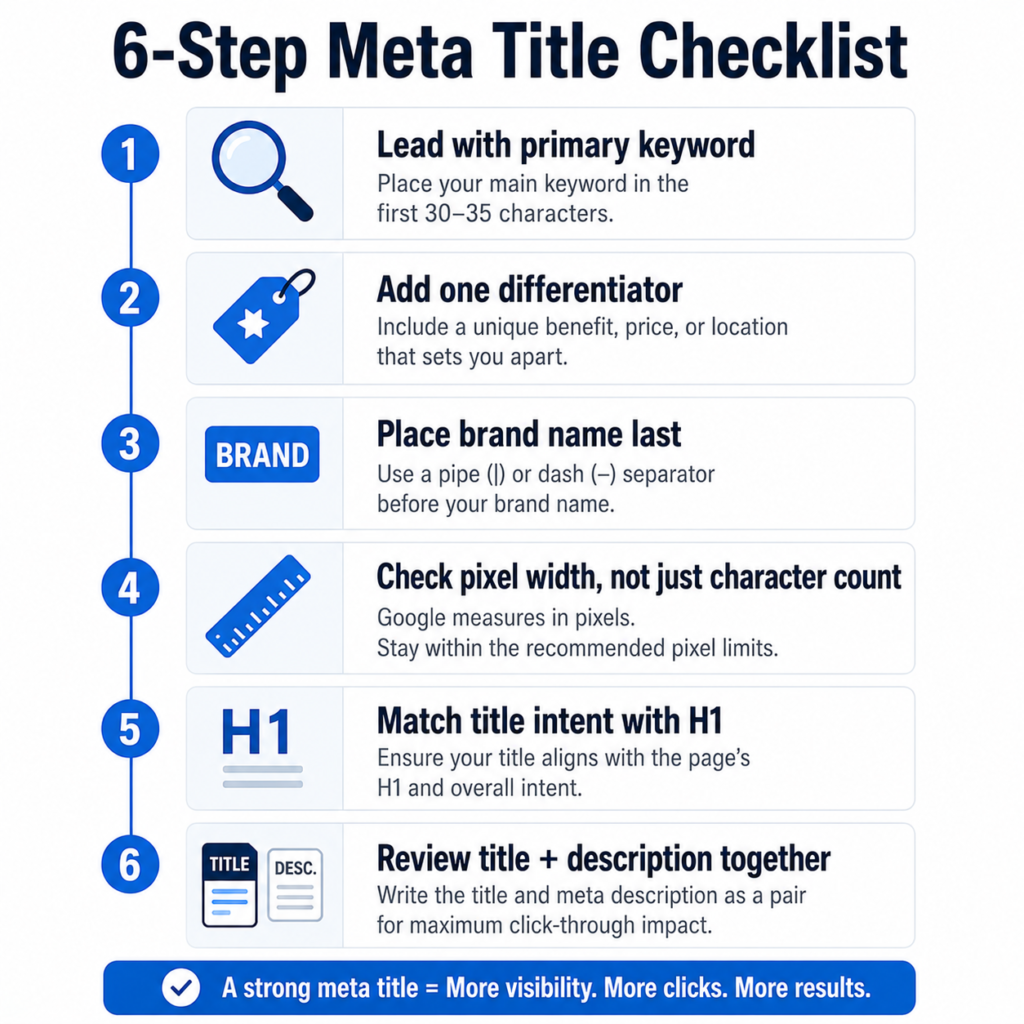
- Draft the title around the primary keyword first, placed within the first 30-35 characters where possible.
- Add one differentiator – price, location, timeframe, or a specific benefit – only if there’s room left.
- Place the brand name at the end, separated by a pipe or dash, unless you’re an established brand people search for by name.
- Run it through a pixel checker rather than trusting the character count alone, especially if the title uses wide capital letters or numerals.
- Compare it against the H1. If they tell two different stories, Google is more likely to override your title tag.
- Check the description in the same pass so the two work together as one snippet, not two disconnected pieces of text.
For agencies or sites managing this across dozens or hundreds of URLs, doing this one page at a time isn’t realistic. That’s the scenario the title tag bulk checker exists for – it flags every title outside the safe range in one pass instead of one page at a time.
When Going Longer Actually Makes Sense
There are legitimate cases for titles that push past 60 characters, and pretending otherwise oversimplifies the topic.
- Mobile-heavy traffic. If the bulk of your audience searches on mobile, you generally have more room before truncation kicks in, since mobile display widths tend to be more forgiving than the desktop 600-pixel ceiling.
- Long-tail, highly specific queries. A title matching a long, specific search phrase word-for-word sometimes needs the extra length to capture that exact intent, and Google can still index and rank on keywords in a title even if part of it gets visually truncated.
- Year or date-specific content. Adding a current year to a guide or comparison post can improve click-through for searchers checking whether the content is current, even if it adds a few characters.
The trade-off is real, though: the longer the title, the higher the odds that the end gets cut, and the end is usually where your brand name or final qualifier lives. This is a judgment call based on your audience and your analytics, not a fixed rule.
Title length is one small piece of a much bigger on-page SEO picture, but it’s one of the few things you can fix in minutes and see the effect on click-through rate within weeks. If your CTR still feels low after cleaning up title length, the issue is often somewhere else entirely – worth a look at why your CTR might be low or this guide on improving CTR without increasing ad spend for the next layer of the problem. And if you haven’t compared how title length interacts with the description yet, the CTR improver tool looks at both pieces together rather than in isolation.
For more SEO tools like the ones mentioned here, visit the SEO tools collection, or browse the full list of marketing calculators and tools on QuickMarketingTools.
Frequently Asked Questions
Does Google have an official character limit for meta titles?
No. Google has stated there’s no fixed limit on title length, but titles get truncated based on pixel width, which functions as a practical limit even without an official character cap.
Why does my title look fine on desktop but get cut off on mobile, or vice versa?
Desktop and mobile use different pixel widths for the title link, and mobile screen sizes vary more than desktop monitors do. The same title can render completely differently depending on the device and even the specific search query, since Google sometimes bolds matched query terms, which adds extra width.
Should every page on my site have a different length title?
Not necessarily a different length, but definitely different wording. Duplicate or boilerplate titles across many pages tend to get rewritten by Google and confuse users trying to tell pages apart in the search results.
Does a longer title hurt my SEO ranking?
Not directly. A title that’s too long mainly risks truncation and a weaker click-through rate, not a ranking penalty. Google can still index and use keywords from a longer title, even the part that doesn’t display.
What’s the fastest way to check dozens of titles at once?
Use a bulk checker rather than testing pages individually. The title tag bulk checker is built for exactly this kind of site-wide audit.

2 thoughts on “Meta Title Length: Best Practices for SEO”
Comments are closed.